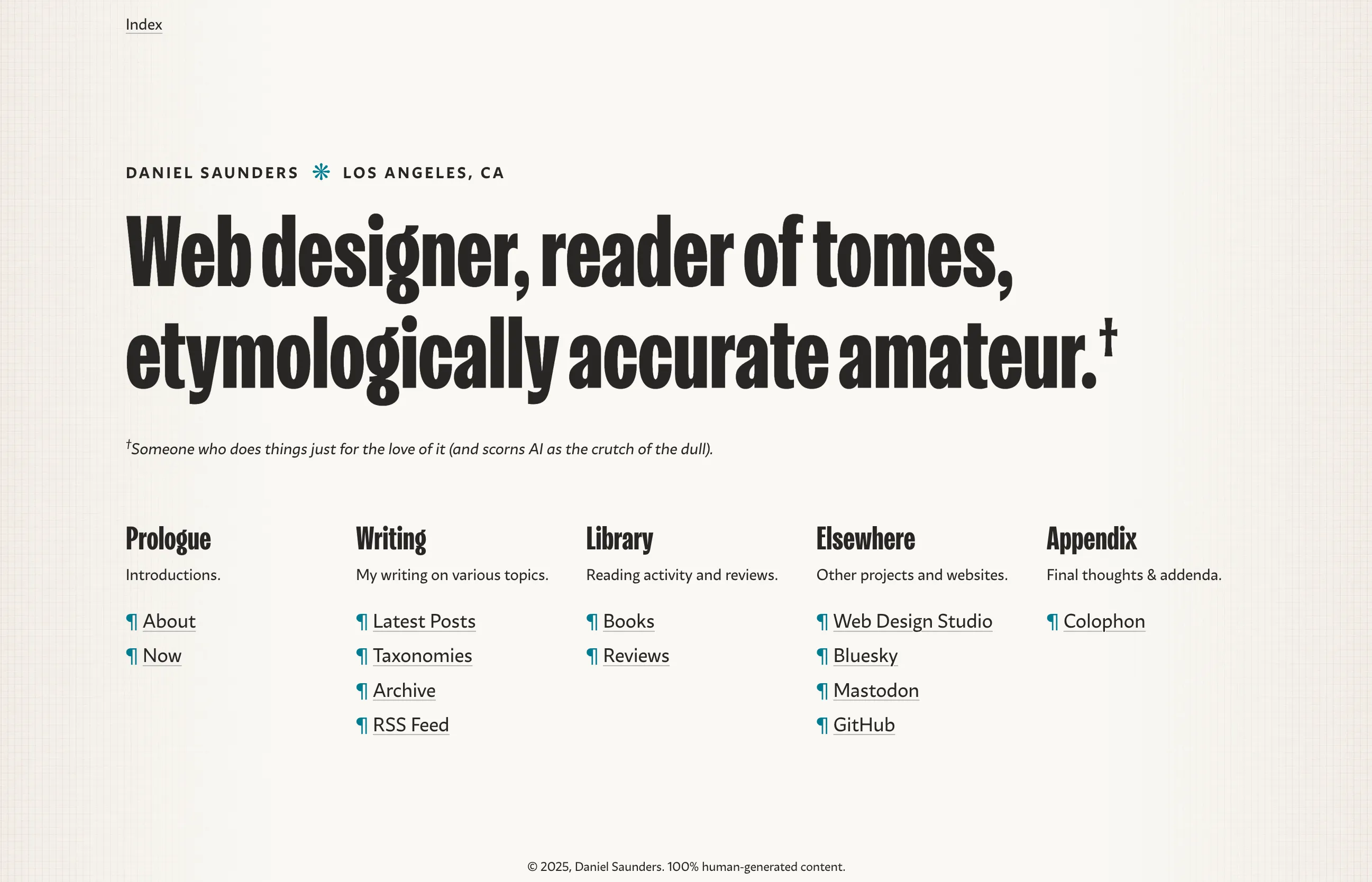
After what has felt like a long period of stagnation, I finally found the motivation to reinvigorate this website with some much-desired changes to its design and architecture. This version is newly built with Astro and is hosted for free on Cloudflare Workers, a setup that is one of the smoothest I’ve used in recent years. The source code is public on GitHub for those who like to take a look under the hood.
Motivation
In many ways, I’m never not in the process of redesigning my personal site. Constant tinkering is an excellent excuse for experimenting with new ideas and technologies (and generally procrastinating on other things). So it was not too much of a surprise when, right on cue, I began to feel like I wanted to make a fresh start almost immediately after I launched the last version of this site in January 2024 (these are the travails, and joys, of a designer/developer).
The reasons for a change were manifold, but primarily I have been conscious of simply wanting to contribute less noise to the web, both visually and informationally. In an ongoing cultural moment of gross usurpation of digital space by AI bloatware, meaningless media opinionating, ad blitzkriegs, and everyone feeling like they have to constantly sell their own personal brand, I feel the need instead to step back and cultivate my own Zen-like corner of simplicity and thoughtfulness on the web. (A big reason why I have also stepped away from most social media platforms.)
Here, if nowhere else, there can exist a truly well-ordered universe of my own making, a cosmos where things are as they appear and where artifice gives way to the sincerity of the original amateur—I title I gladly claim, as it just means someone who does things solely for the love of it. I’m also not going to track you (I use a minimal, privacy-first analytics tool), serve you ads, or hijack your screen with a newsletter popup.
I’m inspired by the digital garden ethos, but other reference points include the commonplace book, the literary index, the old-fashioned blog (à la k-punk), and the world wide web in its original formulation—a network of hyperlinked texts that plays to the strengths of the medium, which is creating associations between ideas that might not have been otherwise evident. I’ll be happy if I’m able to pass on even a fraction of this sense to a visitor who happens upon this site.
Design & Layout
To these ends, I wanted a more pared-down visual design for this version of the site, with a primary focus on typography. Text, after all, is the focus of a blog. I am proud of the writing I choose to share here, and thus I think the overall design should be in the service of a dignifying and engaging reading experience.
I fell in love with Fort Foundry’s Kensington a while ago and have been waiting for the right project to use it in. In its “black” weight, it checks all of the boxes I have for striking headings—bold, eccentric, literary, approachable, and just a bit pretentious (not necessarily a bad thing!). Kensington also comes with a delightful set of ornaments, florals, cartouches, and manicules, which are a lot of fun to play with and which I’m using as icons throughout the site.

To complement Kensington, for setting body text I chose Zetafonts’ Ambra Sans, whose graceful fluidity I find to be very pleasant for online reading (and really, who can resist the descenders on these “f”s). With the indispensable Utopia tool, I’m able to set a fluid scale of sizes for these fonts across screen sizes.
For the layout, I again wanted to keep things very simple. I opted to forego any kind of persistent global navigation (death to the hamburger menu!) in favor of a contextual, “breadcrumbs”-only style navigation header. I really like the simplicity of this, and my hope is that it fosters more exploration of the site for visitors, using the home page “index” as a true central routing station to all of the site’s content areas.
Implementing this idea in Astro was also intuitive and fun; I created a component to dynamically build the breadcrumb links from the current URL path and assign titles by querying entries in Astro’s content collections (all accomplished at build time, with no client-side JavaScript).
Backlinks & Books Library
Another feature I knew I wanted to implement in this version of the site was Obsidian-style backlinks. Given the interconnectedness of all of the pieces of this site, I wanted an easy way to see when a certain post or book is referenced by any other entry on the site. Building this feature required some research and trial and error, and I’m not confident I’m doing it in the most efficient way, but … it works! I’m planning a tutorial post where I’ll go into more detail on how this works.
Backlinks are especially important for the books that I reference throughout my posts and reviews—part of my single-minded pursuit of modeling a digital version of my real-life library. This is a feature that not only facilitates easy navigation between various parts of the site, but also helps me see how and where I am making references between my writing and the books that I’m reading. It’s a powerful design pattern that, in my opinion, greatly enhances both the user experience of the site and my own understanding of my writing.
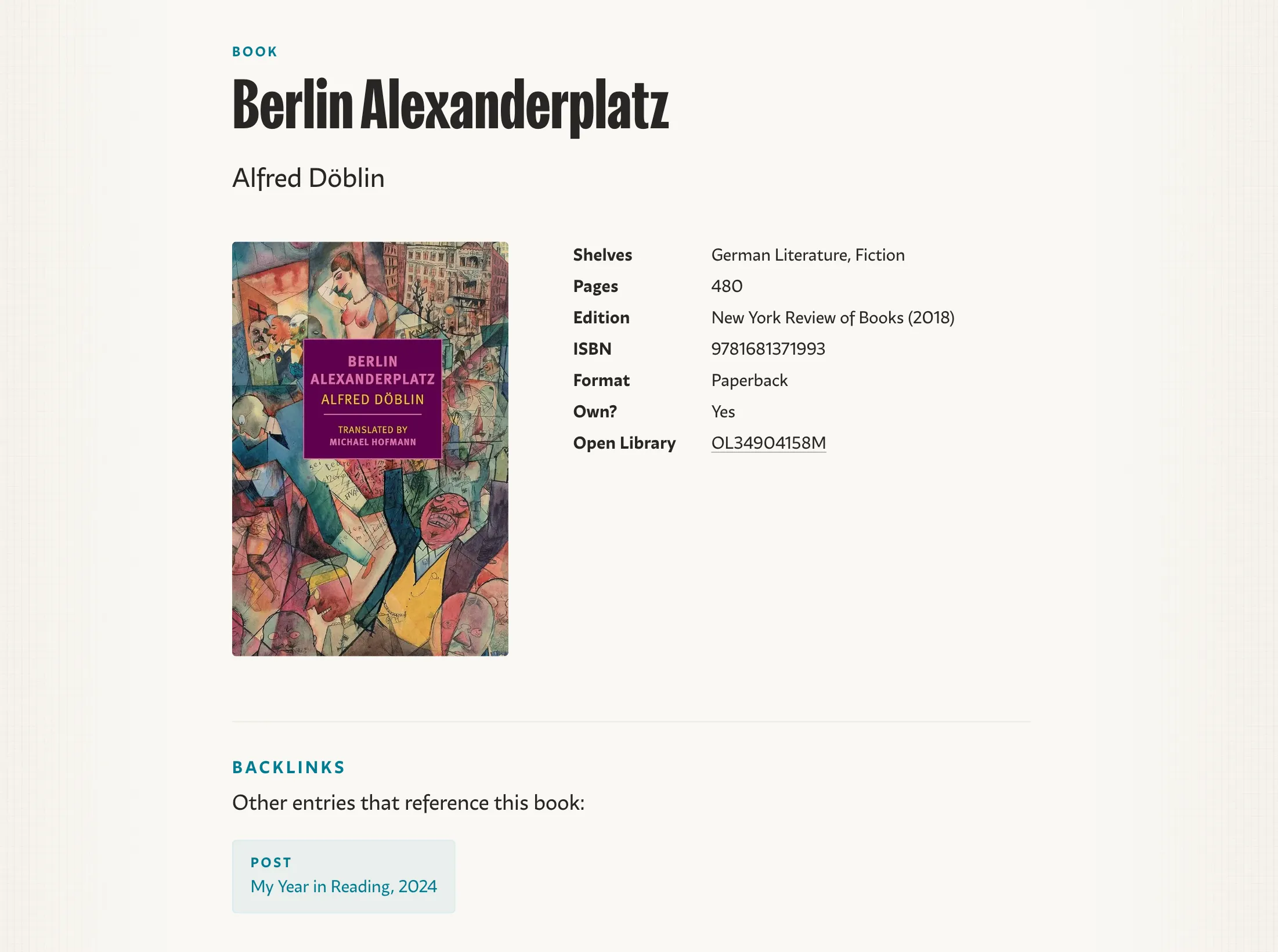
All of the library book data lives in an Airtable base, which is integrated into Astro using @ascorbic’s Airtable loader. In the past, I’ve done all of this work myself using Airtable’s raw HTTP API, which isn’t the most intuitive. It’s pretty amazing when a community solution comes along that just works (and, in Astro, gives you fully typed data to work with). Thanks to the community!
Technical Details
As mentioned, this site is built with Astro (using Typescript features) and deployed on Cloudflare Workers. While I have enjoyed building previous versions of this site with Eleventy and Deno Lume, Astro is one of my go-to tools for building client sites, and so it was the obvious choice for this version of the site. Its amazing schema-typed content collections are perfect for building a blog-based site. Moreover, beyond the great “developer experience” if offers, I find that it just makes it easy to build user-oriented sites—sites that are accessible, content-focused, and minimally JavaScripted.
Pages are statically generated/prebuilt, and for “deployment” I’m simply using Cloudflare’s Wrangler CLI package to upload the build directory straight from my local machine. The ease of this workflow is a breath of fresh air, especially since my last site used a complicated, error-prone, and time-consuming GitHub action to deploy to Deno Deploy.
I actually like this workflow better than the “auto deploy from GitHub repository” model as well, which is partly why I decided not to use Netlify. For one, it means that I don’t have to wait for some slow cloud process to build the site, but can instead use my fast local machine (it currently takes about 30 seconds in total to build and upload ~200 files, and there are some definite improvements that could make it faster). It also allows me to keep my git commits separate from my site deploys (e.g., I don’t need to commit my weighty assets/images directory to GitHub).
Content is mostly written in Markdown files, with many entries using MDX to add Astro components and other dynamic elements. The primary example of this is the FeaturedBook Astro component. In any post or review where I want to reference a book from the library (and thus add it to that book’s backlinks), I simply have to import the component and pass it a book reference id (which comes from Airtable).
---
// YAML frontmatter
---

import FeaturedBook from "@components/books/FeaturedBook.astro";

Here is an inline MDX reference to a book:

<FeaturedBook id="recx7LZurVPABhi99" />
The FeaturedBook component then uses Astro’s getEntry function to look up the id in the books content collection and render the book data.
---
import { getEntry } from "astro:content";

interface Props {
    id: string;
    HeadingLevel?: "h2" | "h3" | "p";
}

const { id, HeadingLevel = "h3" } = Astro.props;

const book = await getEntry("books", id);
---

<article class="featured-book">
	<!-- other markup -->
	<RemoteImage
        alt={(book?.data["Full Title"] as string) ?? ""}
        src={book?.data.Cover?.[0].url ?? undefined}
    />
	<HeadingLevel>
		<a href={`/library/books/${book?.id}`}>{book?.data["Full Title"]}</a>
	</HeadingLevel>
</article>
An interesting problem arises with the book covers; Airtable attachment URLs expire after a two-hour window, so using default image links from Airtable, while convenient, would mean every book image would break when that limit is hit (unless I rebuild my site every two hours, which, given my local-first setup, isn’t really an option at the moment).
To fix this, I created an Astro component that uses Eleventy’s magical Image plugin under the hood to fetch and cache local copies of the images, while also providing all of the image metadata to the markup. The component writes images directly to the static site build directory, which is uploaded to Cloudflare along with the rest of the site’s pages and assets.
---
/* Wrapper around <img> using 11ty Image to generate local
*  files and formats from a remote source
*/
// @ts-expect-error - no types for 11ty Image
import EleventyImage from "@11ty/eleventy-img";

interface Props {
    src: string;
    alt: string;
    width?: number;
    loading?: "lazy" | "eager";
    aspectRatio?: Record<number, number>; // width / height
}

const { src, alt, width = 900, loading = "lazy", aspectRatio } = Astro.props;

// get image metadata with 11ty Image
const imageMetadata = await EleventyImage(src, {
    widths: [width],
    formats: ["webp"],
    outputDir: "./dist/img-opt", // save directly to build dir
    urlPath: "/img-opt/",
    // use the sharp processor to resize to a specific aspect ratio
    transform: (sharp: any) => {
        if (aspectRatio) {
            const ratio = aspectRatio[0] / aspectRatio[1];
            sharp.resize(width, Math.round(width / ratio));
        }
    },
    // dryRun: true,
});

const image = imageMetadata.webp[0];
---

<img
    alt={alt}
    decoding={loading == "lazy" ? "async" : "auto"}
    height={image.height}
    loading={loading}
    src={image.url}
    width={image.width}
/>
For styling, in my opinion you can’t do better than modern vanilla CSS, enhanced with Lightning CSS features like minification and transpilation. CSS has become a powerful programming language in the last few years, and new features are constantly being added. I have yet to run into a single design idea or layout that I can’t accomplish with the above setup.
Many of my core layout compositions are influenced by the highly efficient patterns from Every Layout (definitely worth a purchase to support the superb work of Andy Bell and Heydon Pickering). One of my personal favorite tricks is to extend Andy’s quintessential flow spacing composition with musical “tempo” modifiers inspired by Classnames. The flow class sets automatic spacing for its child elements, and paired with HTML data attributes and CSS custom properties, you can quickly set various tempo levels based on a preset spacing scale:
.flow {
    & > * + * {
        margin-block-start: var(--flow-space, 1rem);
    }

    &[data-tempo="andante"] {
        --flow-space: var(--space-l);
    }

    &[data-tempo="moderato"] {
        --flow-space: var(--space-m);
    }

    &[data-tempo="allegro"] {
        --flow-space: var(--space-s);
    }
}
Then, if I want a certain element to have flow spacing with a “quick tempo”, it’s easy to add the class with its corresponding data attribute. It’s also just nice to see musical terms sprinkled throughout my codebase.
<article class="flow" data-tempo="allegro">
    <h3>Brahms: Symphony No. 1 in C Minor, Op. 68: Movement I</h3>
    <p>Un poco sostenuto — Allegro</p>
</article>
And as for the site’s JavaScript, well, it’s basically nil—the site currently serves less than ~5kb, which is mostly Astro’s prefetch functionality loading page data in the background when you hover over a link, for a progressively enhanced user experience.
That’s it for a quick tour of the site—thanks for checking it out and reading this far, and let me know on Bluesky on Mastodon what you think!